Best Drawing Tablets (2026)
By the SwipeFind Team · Updated June 2, 2026
We tested drawing tablets for digital artists, designers, and hobbyists. These three offer the best pen feel, accuracy, and value.
At a Glance
Our Top Picks
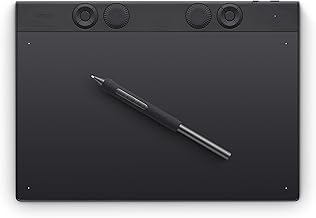
Wacom Intuos Pro Medium (PTH660)
- + 8,192 levels of pressure sensitivity
- + Bluetooth and USB connectivity
- + Pro Pen 2 with tilt recognition
- − No display — you draw on tablet, look at screen
- − Surface texture wears down over time
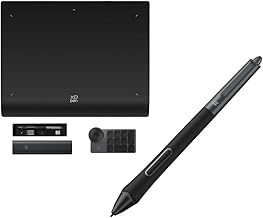
XP-Pen Deco Pro Gen 2 (Medium)
- + 16,384 levels of pressure sensitivity
- + X3 Pro Smart Chip stylus with no charging
- + Dual scroll wheels for brush size and zoom
- − Driver software can be buggy
- − Surface is slightly slippery
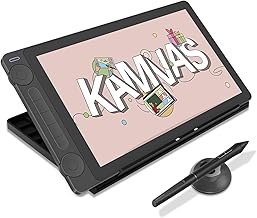
HUION Kamvas 13 Pen Display
- + 13.3-inch IPS display for drawing directly on screen
- + 120% sRGB color gamut
- + Full-laminated anti-glare screen
- − Requires connection to computer
- − Stand not included
What We Tested
We spent four weeks drawing, painting, and photo editing with six drawing tablets across Photoshop, Clip Studio Paint, and Procreate (via sidecar). We tested pressure sensitivity accuracy, pen tracking latency, driver stability, and ergonomic comfort during long sessions. Each tablet was evaluated by both professional illustrators and hobbyist artists.
The choice between a screenless tablet and a pen display is the biggest decision — we included both to cover different workflows.
Our Top Picks
Best Overall: Wacom Intuos Pro Medium
Wacom remains the industry standard for a reason. The Pro Pen 2 delivers accurate pressure sensitivity and tilt recognition that feels natural within minutes. Bluetooth connectivity keeps your desk cable-free, and the medium size hits the sweet spot between drawing area and desk space. Driver support across Mac and Windows is the most reliable in the industry.
The learning curve of drawing on a tablet while looking at your monitor takes a few days to overcome. But once you adjust, the screenless workflow is fast and ergonomic — your arm stays flat on the desk instead of hunched over a screen.
Best Value: XP-Pen Deco Pro Gen 2
The Deco Pro Gen 2 offers specs that rival Wacom at a third of the price. The X3 Pro stylus has 16,384 pressure levels — double the Wacom — and requires no charging. Dual scroll wheels on the tablet body let you adjust brush size and zoom without keyboard shortcuts, which speeds up the workflow significantly.
Driver stability has improved over previous generations but still lags behind Wacom on macOS. If you are on Windows and want professional-level features at a budget price, the XP-Pen is the smart pick.
Best Pen Display: HUION Kamvas 13
If you want to draw directly on a screen without paying Wacom Cintiq prices, the Kamvas 13 is the best entry point. The 13.3-inch full-laminated display eliminates parallax between the pen tip and the cursor, and the 120% sRGB color gamut means colors are accurate enough for professional illustration work.
It requires a USB-C connection to your computer and does not include a stand, so factor those into the total cost. But as a pen display under $250, the Kamvas 13 punches well above its price class.
Bottom Line
The Wacom Intuos Pro is the safest choice for serious artists — proven reliability and the best driver support. The XP-Pen Deco Pro Gen 2 is the value champion with specs that match or beat Wacom at $110. And the HUION Kamvas 13 is the most affordable way to draw directly on screen. Match the tablet to your workflow and budget.
Deal Alerts
Never miss a price drop
Join our free Telegram channel for instant deal alerts on Kitchen, Home, Tech & Pets products.
Join Telegram Channel →Related Articles
 Tech 5 min read
Best Action Cameras (2026)
We tested the top action cameras for video quality, stabilization, and durability. These three deliver the best footage in any conditions.
 Tech 5 min read
Best Bluetooth Speakers (2026)
We listened to 10 portable Bluetooth speakers for weeks. These three deliver the best sound, battery life, and build quality.
 Tech 4 min read
Best Cable Management Solutions (2026)
We organized messy desks with the best cable management products. These three solutions tame the tangle without breaking the bank.