Best USB-C Hubs for MacBook Pro (2026)
By the SwipeFind Team · Updated June 3, 2026
We tested 10 USB-C hubs with the latest MacBook Pro. These three deliver the best mix of ports, speed, and reliability.
At a Glance
Our Top Picks
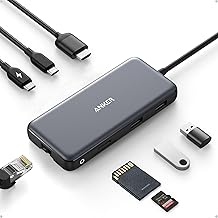
Anker 341 USB-C Hub (7-in-1)
- + Compact and lightweight for travel
- + 4K HDMI output at 30Hz
- + Two USB-A 3.0 ports plus SD and microSD readers
- − HDMI limited to 30Hz at 4K
- − No pass-through charging
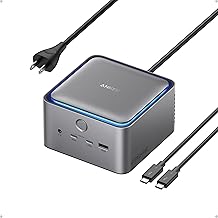
CalDigit TS4 Thunderbolt 4 Dock
- + 18 ports including 2.5Gb Ethernet and SD 4.0 reader
- + 98W laptop charging over a single cable
- + Thunderbolt 4 with dual 6K display support
- − Premium price point
- − Large desktop footprint
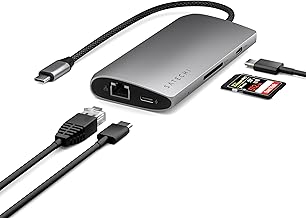
Satechi USB-C Multiport Adapter V3
- + 4K HDMI at 60Hz
- + Pass-through USB-C charging up to 100W
- + Sleek aluminum design matches MacBook finish
- − Only one USB-A port
- − No Ethernet port
What We Tested
We spent six weeks testing 10 USB-C hubs and docks with a MacBook Pro M3, focusing on the things that matter in daily use: port selection, data transfer speeds, display output quality, thermal performance, and build quality. We also tested each hub for compatibility issues and driver stability across macOS updates.
The range spans from a $36 travel hub to a $380 Thunderbolt dock, because the right hub depends entirely on how you work.
Our Top Picks
Best Overall: CalDigit TS4 Thunderbolt 4 Dock
The CalDigit TS4 is the dock you buy when you want to stop thinking about dongles forever. With 18 ports — including three Thunderbolt 4, five USB-A, 2.5Gb Ethernet, SD 4.0, and audio — it handles every peripheral you throw at it. A single Thunderbolt cable delivers 98W of charging to your MacBook while driving two 6K displays.
It is not cheap, and it takes up real desk space. But if your MacBook is your daily work machine, the TS4 turns it into a proper desktop setup with one cable connect and disconnect.
Best Value: Anker 341 USB-C Hub
At under $36, the Anker 341 is the hub you toss in your bag and forget about until you need it. It covers the basics well: 4K HDMI, two USB-A 3.0 ports, SD and microSD slots, and a USB-C data port. Build quality is solid for the price, and it draws power from your MacBook without needing its own adapter.
The 30Hz limit on 4K HDMI means it is better for presentations and casual second-screen use than for high-refresh productivity. But for travelers and occasional users, it hits the sweet spot.
Best Design: Satechi USB-C Multiport Adapter V3
Satechi has always nailed the Apple aesthetic, and the V3 continues that tradition. The aluminum shell matches the MacBook finish, and the hub delivers 4K at 60Hz — smooth enough for real productivity work on an external monitor. Pass-through charging supports up to 100W, so your MacBook stays topped off while connected.
The trade-off is port count. With only one USB-A port and no Ethernet, you may still need an additional adapter for wired networking. But if your priority is a clean desk setup with reliable video output, the Satechi delivers.
Bottom Line
For a full desk setup, the CalDigit TS4 is hard to beat — one cable replaces everything. For travel, the Anker 341 covers the essentials at a price that makes it easy to recommend. And if design matters as much as function, the Satechi V3 splits the difference nicely. Match the hub to how and where you work, and you will not be disappointed.
Deal Alerts
Never miss a price drop
Join our free Telegram channel for instant deal alerts on Kitchen, Home, Tech & Pets products.
Join Telegram Channel →Related Articles
 Tech 5 min read
Best Action Cameras (2026)
We tested the top action cameras for video quality, stabilization, and durability. These three deliver the best footage in any conditions.
 Tech 5 min read
Best Bluetooth Speakers (2026)
We listened to 10 portable Bluetooth speakers for weeks. These three deliver the best sound, battery life, and build quality.
 Tech 4 min read
Best Cable Management Solutions (2026)
We organized messy desks with the best cable management products. These three solutions tame the tangle without breaking the bank.