Best Webcams for Remote Work (2026)
By the SwipeFind Team · Updated June 6, 2026
We tested 8 webcams in real video calls and recordings. These three make you look and sound professional from home.
At a Glance
Our Top Picks
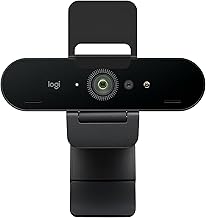
Logitech Brio 4K Pro Webcam
- + True 4K resolution with HDR for challenging lighting
- + Three field-of-view options: 65, 78, and 90 degrees
- + Windows Hello facial recognition for fast login
- − Software can be buggy on macOS
- − Noise reduction on the built-in mic is average
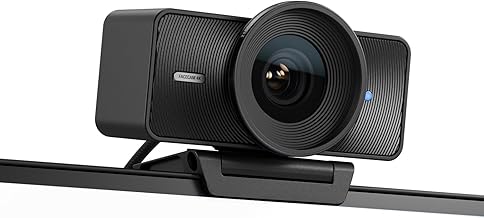
Elgato Facecam Pro
- + 4K60 video with Sony STARVIS sensor
- + Uncompressed video output eliminates artifacts
- + Professional-grade manual controls for exposure, white balance, and ISO
- − No built-in microphone
- − Premium price requires separate mic investment
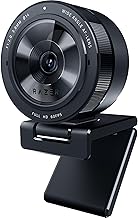
Razer Kiyo Pro Ultra
- + Large Sony sensor excels in low light
- + 4K resolution with physical privacy shutter
- + AI-powered face tracking keeps you centered
- − Large camera body may block part of your screen on thin monitors
- − Razer Synapse software is heavy
What We Tested
We tested 8 webcams over three weeks of real video calls on Zoom, Google Meet, and Microsoft Teams, plus recorded test footage in four different lighting conditions: bright window behind us, dim room, overhead fluorescent, and a dedicated ring light. We evaluated image quality, color accuracy, autofocus speed, low-light performance, microphone quality, and software reliability.
The gap between a laptop webcam and a dedicated external webcam is still one of the biggest upgrades remote workers can make. Even the least expensive option here outperforms every built-in laptop camera we tested.
Our Top Picks
Best Overall: Logitech Brio 4K Pro
The Brio has held the top spot in webcam recommendations for a reason — it consistently delivers excellent image quality across a wide range of lighting conditions without requiring manual tweaking. The HDR mode handles the classic problem of a bright window behind you by balancing exposure so your face stays visible and the background does not blow out.
Three field-of-view settings let you switch between a tight headshot for one-on-one calls, a standard frame for everyday meetings, and a wide angle for showing a whiteboard or shared workspace. Windows Hello support is a bonus for PC users who want fast facial recognition login.
The main weakness is the macOS software, which occasionally forgets settings between sessions. But the camera’s auto-adjustments are good enough that most Mac users can skip the software entirely.
Best for Streamers: Elgato Facecam Pro
The Facecam Pro is built for people who treat video quality as part of their professional identity. The Sony STARVIS sensor captures 4K at 60 frames per second with zero compression artifacts — what comes out of this camera looks like it came from a DSLR, not a webcam.
Full manual controls for exposure, white balance, ISO, and focus give you the same creative control as a traditional camera. The trade-off is intentional: there is no built-in microphone, because Elgato assumes anyone buying this camera already has a dedicated mic setup. If you do, the video quality is in a class of its own at this price.
Best Low Light: Razer Kiyo Pro Ultra
If your home office has challenging lighting — and most do — the Kiyo Pro Ultra compensates with a physically larger sensor that gathers more light than competitors. In our dim-room tests, it produced noticeably cleaner, less grainy footage than every other webcam in the lineup.
AI-powered face tracking keeps you centered in the frame as you move, which is useful if you tend to shift around or lean back during long calls. The physical privacy shutter is a simple but appreciated touch. Just be aware that the camera body is large and may block a strip of screen on thinner monitors.
Bottom Line
The Logitech Brio 4K Pro is the safest recommendation for most remote workers — great image quality with minimal setup. The Elgato Facecam Pro is the choice for streamers and creators who want broadcast-quality video. And the Razer Kiyo Pro Ultra solves the low-light problem that plagues most home office setups. All three are a dramatic upgrade over any built-in laptop camera.
Deal Alerts
Never miss a price drop
Join our free Telegram channel for instant deal alerts on Kitchen, Home, Tech & Pets products.
Join Telegram Channel →Related Articles
 Tech 5 min read
Best Action Cameras (2026)
We tested the top action cameras for video quality, stabilization, and durability. These three deliver the best footage in any conditions.
 Tech 5 min read
Best Bluetooth Speakers (2026)
We listened to 10 portable Bluetooth speakers for weeks. These three deliver the best sound, battery life, and build quality.
 Tech 4 min read
Best Cable Management Solutions (2026)
We organized messy desks with the best cable management products. These three solutions tame the tangle without breaking the bank.