Best Wireless Mouse for Productivity (2026)
By the SwipeFind Team · Updated June 4, 2026
We tested the top wireless mice for work and productivity. These three balance comfort, precision, and multi-device support.
At a Glance
Our Top Picks
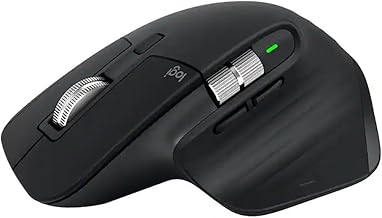
Logitech MX Master 3S Wireless Mouse
- + MagSpeed scroll wheel is fast and precise
- + Connects to three devices simultaneously via Bluetooth
- + Ergonomic sculpted shape for all-day comfort
- − Heavy at 141 grams
- − USB-C charging only on front edge
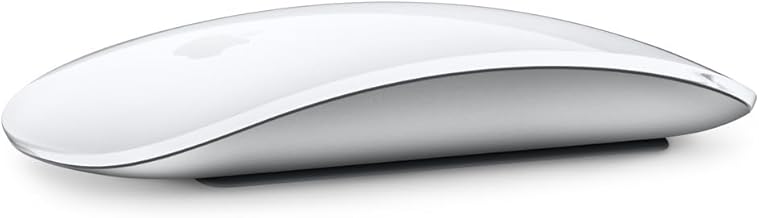
Apple Magic Mouse (USB-C)
- + Multi-touch surface supports gestures natively
- + Seamless macOS integration with no setup
- + Slim, lightweight design at 99 grams
- − Flat profile causes wrist strain over long sessions
- − No right-click button out of the box
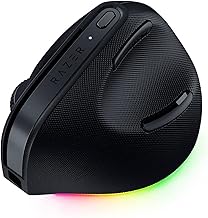
Razer Pro Click Mini Wireless Mouse
- + Compact and travel-friendly design
- + Dual-mode Bluetooth and 2.4GHz dongle
- + Mechanical switches with crisp, quiet clicks
- − Small size may not suit large hands
- − Side buttons are hard to reach
What We Tested
We used eight wireless mice as our daily drivers for three weeks, switching between them for writing, spreadsheet work, design tasks, and video calls. We tested tracking accuracy, scroll precision, multi-device switching, battery life, and comfort during sessions lasting six hours or more.
A productivity mouse needs to disappear into your workflow. You should never think about it — it should just work.
Our Top Picks
Best Overall: Logitech MX Master 3S
The MX Master 3S has been the default productivity mouse for years, and nothing else has caught up. The MagSpeed scroll wheel shifts between precise ratcheted scrolling and free-spinning mode depending on how fast you flick it — perfect for navigating long documents and spreadsheets. You can pair it to three devices and switch between them with a button on the bottom.
At 141 grams it is on the heavy side, and the USB-C charging port on the front edge means you cannot use it while it charges without the cable sticking out awkwardly. But for desktop productivity, the MX Master 3S is the standard.
Best for Mac: Apple Magic Mouse
The Magic Mouse is polarizing, but for Mac users who want gesture support, nothing else comes close. The entire top surface is a multi-touch trackpad — swipe between desktops, scroll in any direction, and navigate with the same gestures you use on your MacBook trackpad. Setup is instant on macOS, and the slim profile looks clean on any desk.
The flat design is the problem. Extended use causes wrist fatigue for most people, and there is no physical right-click button. If you already love the Magic Mouse from your MacBook experience, you will be happy. Otherwise, the MX Master is more comfortable.
Best Portable: Razer Pro Click Mini
Razer is known for gaming gear, but the Pro Click Mini is a serious productivity mouse in a travel-friendly package. It connects via Bluetooth or the included 2.4GHz dongle, and the mechanical switches deliver satisfying, quiet clicks that work well in shared offices. Battery life runs to 725 hours on a single AA battery.
The compact size that makes it great for travel can feel cramped for larger hands during long desktop sessions. But if you split time between an office and working on the go, the Pro Click Mini is a smart pick.
Bottom Line
The MX Master 3S is the best productivity mouse you can buy for your desk. The Apple Magic Mouse is worth it for Mac users who want gesture control. And the Razer Pro Click Mini is the one to grab when you need a serious mouse that fits in your laptop bag. Choose based on where you work most, and you will be set.
Deal Alerts
Never miss a price drop
Join our free Telegram channel for instant deal alerts on Kitchen, Home, Tech & Pets products.
Join Telegram Channel →Related Articles
 Tech 5 min read
Best Action Cameras (2026)
We tested the top action cameras for video quality, stabilization, and durability. These three deliver the best footage in any conditions.
 Tech 5 min read
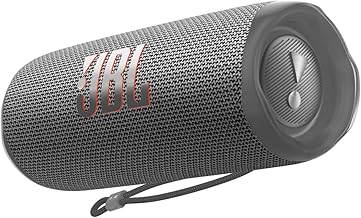
Best Bluetooth Speakers (2026)
We listened to 10 portable Bluetooth speakers for weeks. These three deliver the best sound, battery life, and build quality.
 Tech 4 min read
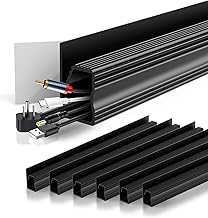
Best Cable Management Solutions (2026)
We organized messy desks with the best cable management products. These three solutions tame the tangle without breaking the bank.